🎯 walter75 - Lead Management
Complete CRM lead management with AI-powered scoring, automated routing, and team collaboration
📋 Overview
A complete lead management system for Microsoft Dynamics 365 Business Central that enables SMBs to capture, score, route, and convert leads without external CRM systems. Features AI-powered scoring with multiple models, intelligent routing engine, team-based collaboration, interactive Kanban boards, and comprehensive analytics.
🤖 AI-Powered Scoring
Multiple configurable scoring models with rule-based intelligence
🎯 Automated Routing
Priority-based assignment to teams or individuals with round-robin support
👥 Team Collaboration
Shared lead ownership with seamless handoff to opportunities
📊 Kanban Pipeline
Visual drag-and-drop board for pipeline management
📈 Analytics Dashboard
Real-time metrics, conversion tracking, and performance reporting
🔗 BC Integration
Native integration with Contacts, Opportunities, and Sales processes
🔢 Technical Details
Object ID Range: 91700-91799
Dependencies: walter75 - BaseApp Basic
Target Platform: Business Central Cloud 27.0+
Development Time: 3-4 weeks (Dec 2024)
🌟 Key Features
Lead Capture & Management
Quick Capture Mode
- Fast lead entry with minimal fields (Company, Email, Phone)
- Source code tracking for attribution
- GDPR-compliant consent management
- Auto-create BC Contacts on engagement
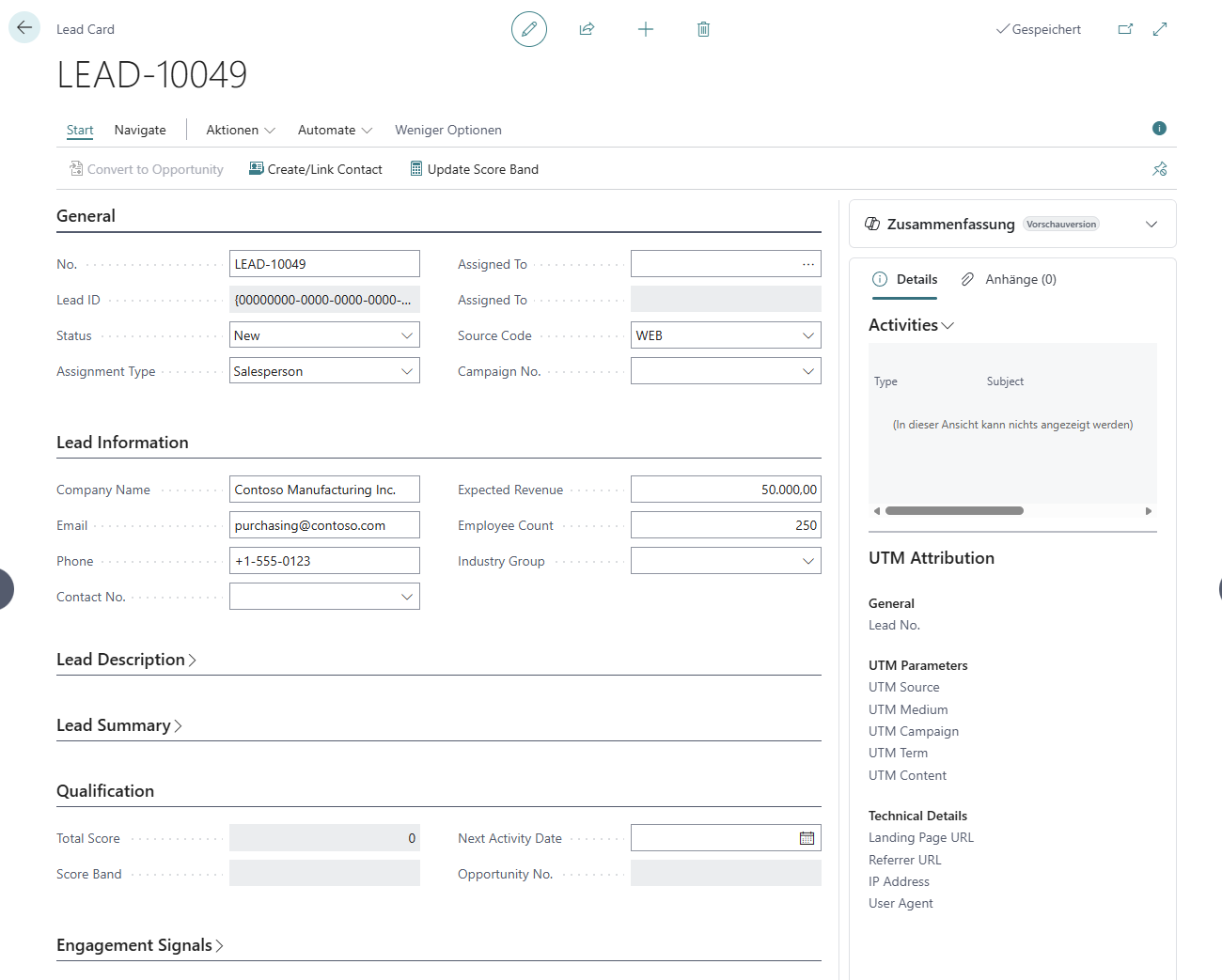 Lead Card with company details and engagement signals
Status Workflow
- New: Just received, not yet reviewed
- Contacted: Sales rep made first contact
- Qualified: Meets criteria, ready for opportunity
- Converted: Successfully converted to opportunity
- Disqualified: Not a fit, archived
Multi-Model Lead Scoring
Configure multiple scoring strategies and switch between them without changing lead data.
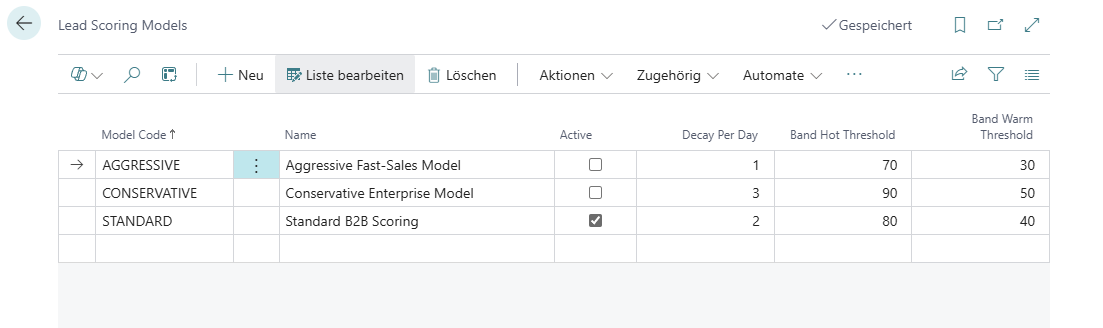 Three pre-configured scoring models: Standard, Aggressive, Conservative
Scoring Rules
- Source-based scoring (web, email, referral, phone)
- Company size weighting (employee count, revenue)
- Engagement signals (website visits, email opens)
- Custom rule creation with point values
- Real-time score calculation
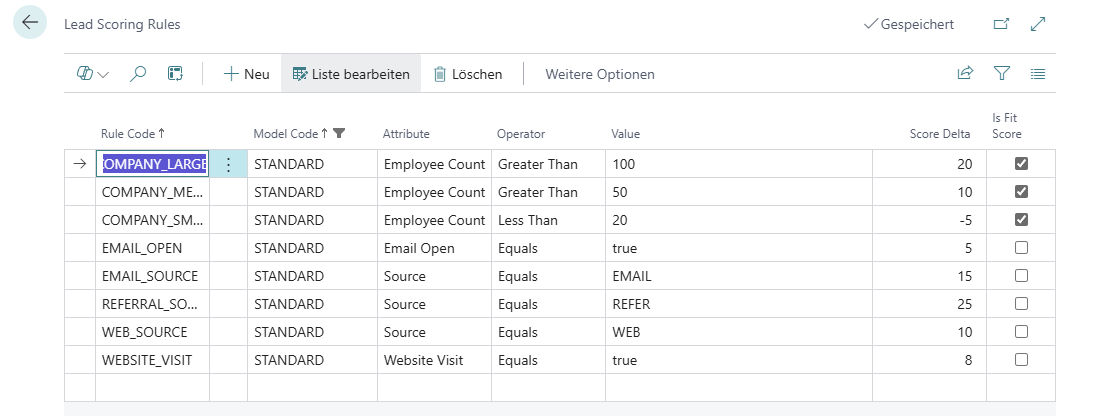 Configurable scoring rules with point values
Score Bands
- 🔥 Hot: Score ≥ 70 (immediate priority)
- 🌡️ Warm: Score 40-69 (active follow-up)
- ❄️ Cold: Score < 40 (nurture campaign)
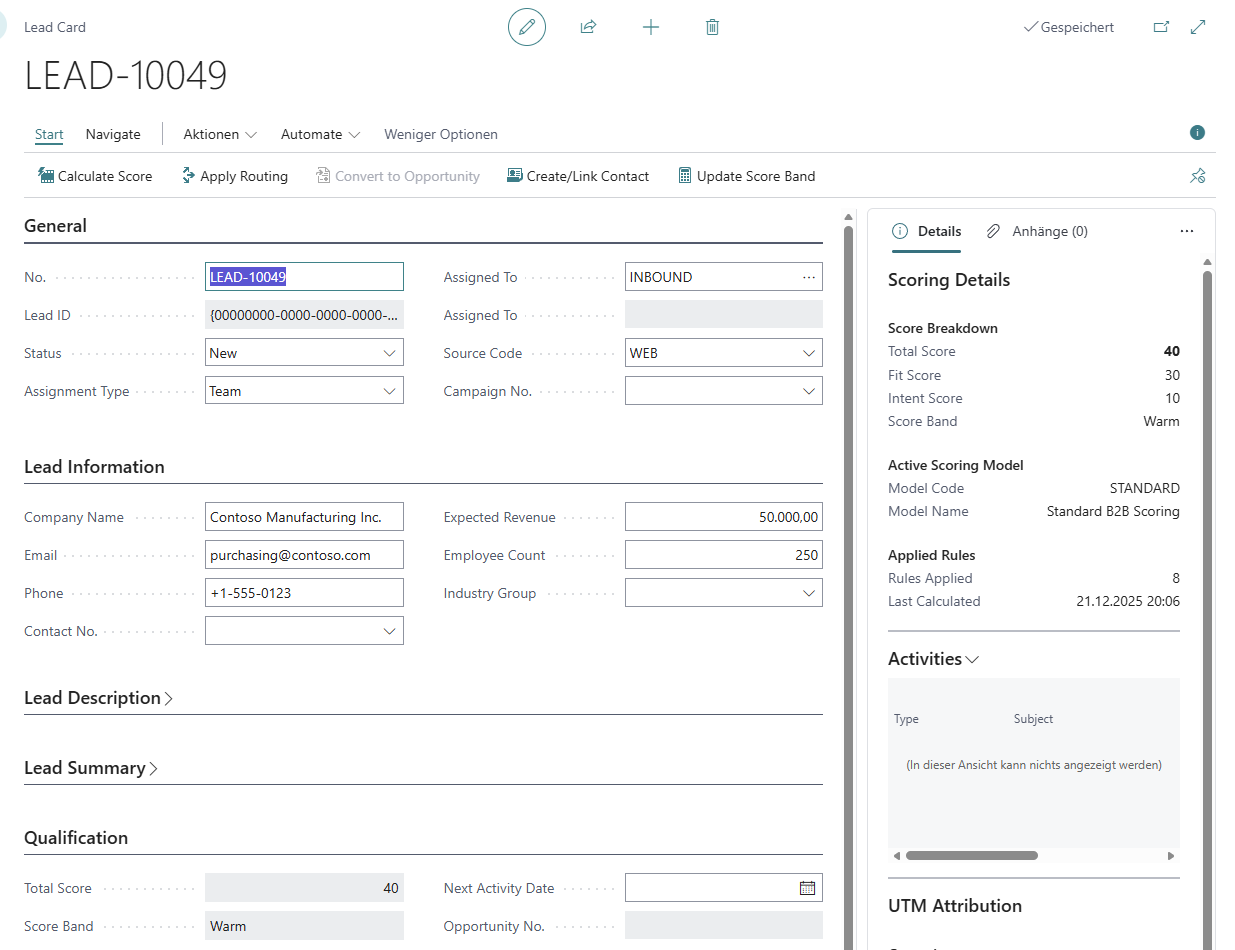 Scoring Details FactBox showing applied rules
Intelligent Routing Engine
Priority-Based Routing
- Rules execute in priority order
- First matching rule wins
- Mix team and individual assignments
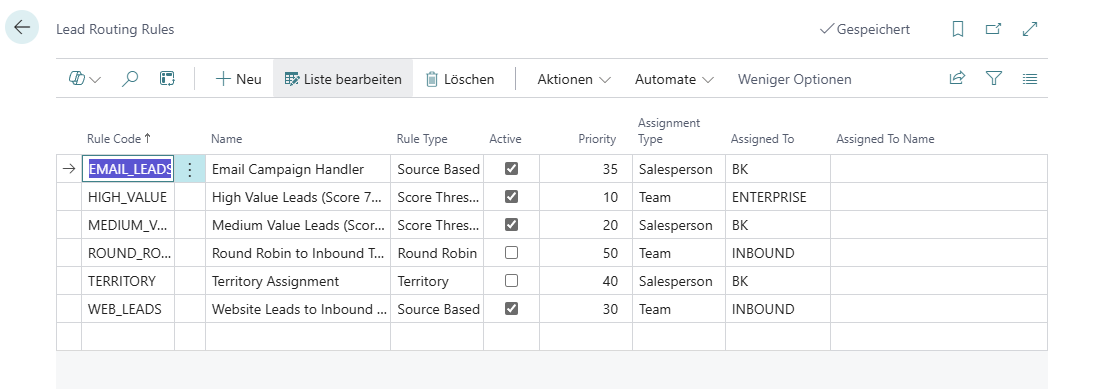 Routing rules with priority hierarchy
Rule Types
- Score Threshold: Route based on lead score
- Source-Based: Route by lead source code
- Territory: Geographic assignment
- Round Robin: Fair distribution across salespersons
Assignment Strategies
- Assign to teams for collaborative selling
- Assign to individuals for direct ownership
- Automatic rotation with round-robin
- Manual override with full audit trail
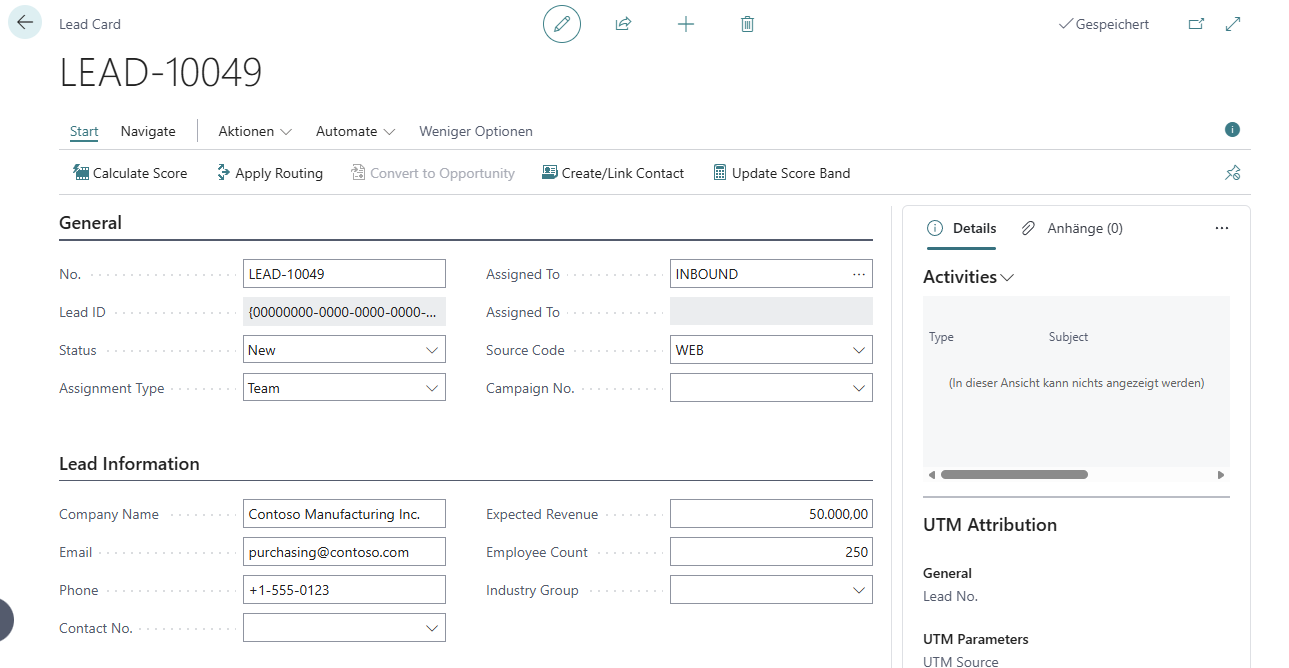 Automated routing assigns leads to teams or salespersons
Team Collaboration
Team-Based Assignments
- Shared lead ownership among team members
- All team members can see and work team leads
- Perfect for pod-based or inbound response teams
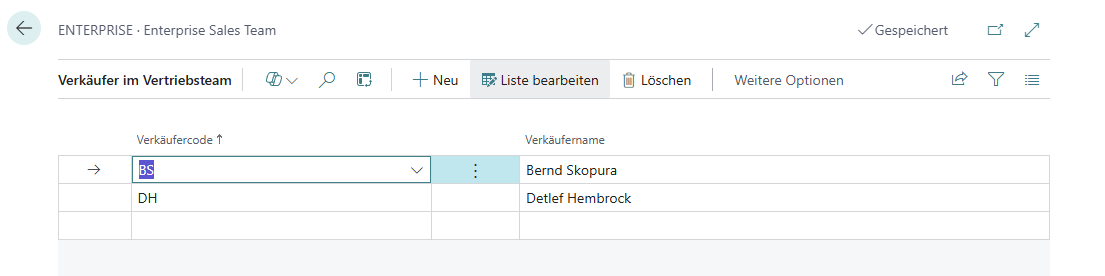 Team structure with member assignments
Team to Individual Handoff
- Convert qualified leads to opportunities
- System prompts to select team member for ownership
- Seamless transition from collaboration to individual accountability
Interactive Kanban Board
Visual Pipeline Management
- Drag-and-drop leads between stages
- Color-coded by score band (Hot/Warm/Cold)
- Real-time stage counts
- Filter by owner, score band, or source
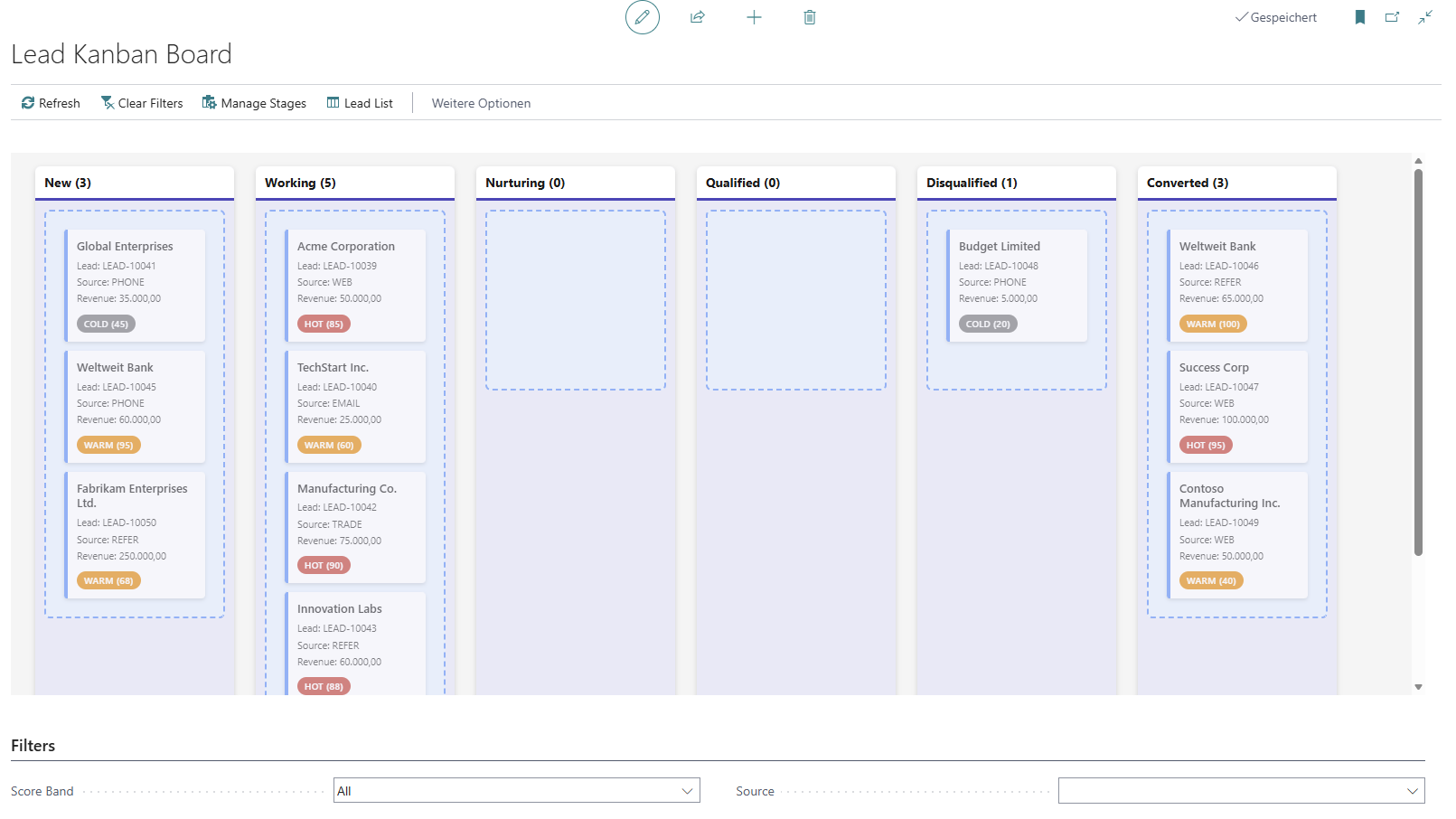 Kanban board with lead stages and drag-and-drop
Stage Management
- Custom pipeline stages with sequence control
- Default probability % per stage
- Automatic probability update on stage change
- Excludes Converted/Disqualified leads
Analytics & Reporting
Real-Time Dashboard
- Total active leads and pipeline value
- Hot leads count with drill-down
- Conversion rate tracking (30-day)
- Activity metrics (open/overdue)
- Average score calculation
Performance Queries
- Lead Funnel Analysis: Stage-based conversion rates
- Source Performance: Lead source effectiveness metrics
- User Performance: Salesperson activity and conversion tracking
- Campaign ROI: UTM-based marketing attribution
Export & Integration
- Export to Excel/Power BI via queries
- OData/REST API endpoints
- Power Automate integration
- Custom report development
Audit Trail & Compliance
Assignment Log
- Full history of all lead reassignments
- Tracks From/To assignment changes
- Reason tracking (automatic vs manual)
- Timestamp and user tracking
System Audit Fields
- SystemCreatedBy / SystemCreatedAt
- SystemModifiedBy / SystemModifiedAt
- FlowFields for username display
GDPR Compliance
- Marketing consent tracking
- Data classification on all fields
- Consent source and timestamp
- Right to be forgotten support
📦 Installation
Install Dependencies
First install walter75 - BaseApp Basic
Download Extension
Download the latest .app file from Releases
Install in Business Central
Install via Extension Management in Business Central
Create Demo Data
Run SEW Demo Data Management to create sample leads, models, and rules
🔧 Configuration
Lead Setup
- Search for SEW Lead Setup in Business Central
- Configure:
- Lead No. Series: Auto-numbering pattern
- Default Owner: Optional default salesperson
- Auto Create Contact On Working: Recommended: Yes
- Enable Quick Capture: Recommended: Yes
- SLA First Response: Hours for response target
Lead Sources
- Search for SEW Lead Sources
- Create sources for attribution tracking:
- WEB-CONTACT (Website contact form)
- EVENT-TRADESHOW (Trade show leads)
- REFERRAL (Customer referrals)
- EMAIL (Direct email inquiries)
Lead Stages
- Search for SEW Lead Stages
- Configure your pipeline stages:
- Set Sequence for display order
- Set Probability % for forecasting
- Final Stage: Marks stage as won/lost
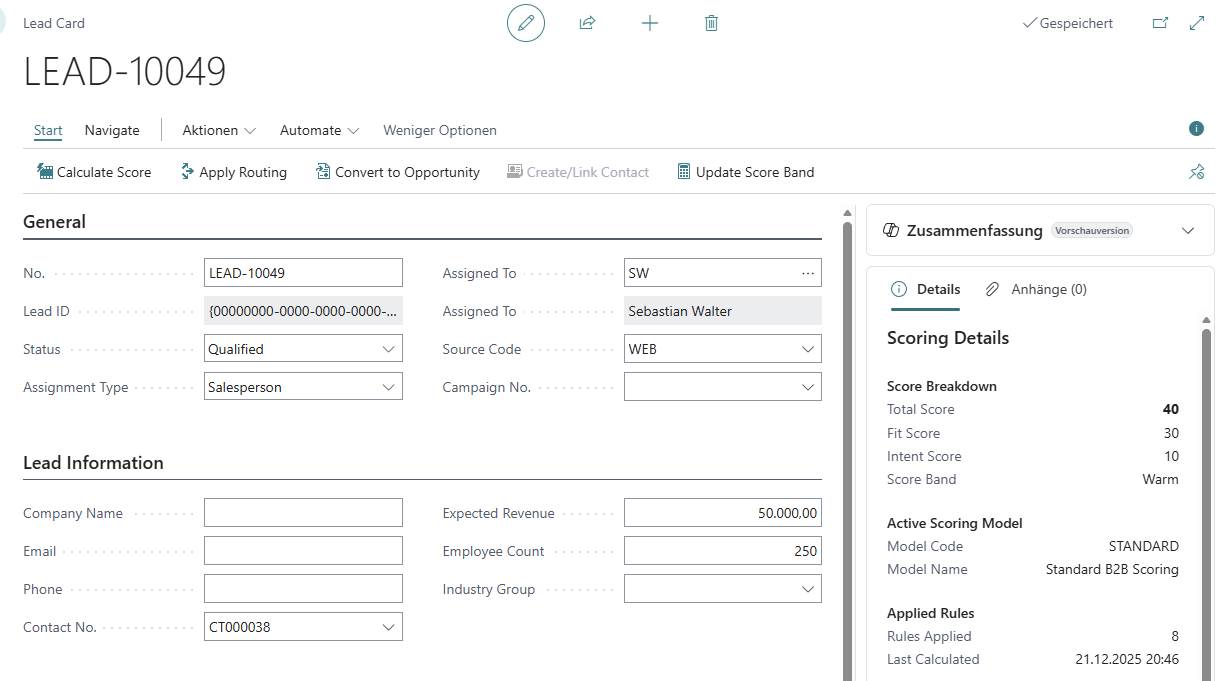 Lead status progression in dropdown
Scoring Models
- Search for SEW Lead Scoring Models
- Create or modify models:
- STANDARD: Balanced approach
- AGGRESSIVE: High velocity sales
- CONSERVATIVE: Selective qualification
- Click Navigate → Scoring Rules to define point values
- Set one model as Active
Routing Rules
- Search for SEW Lead Routing Rules
- Create rules with priority order:
- Lower priority number = higher precedence
- Set Rule Type, Condition, Assignment Type
- Choose Team Code or Salesperson Code
- Test with sample leads
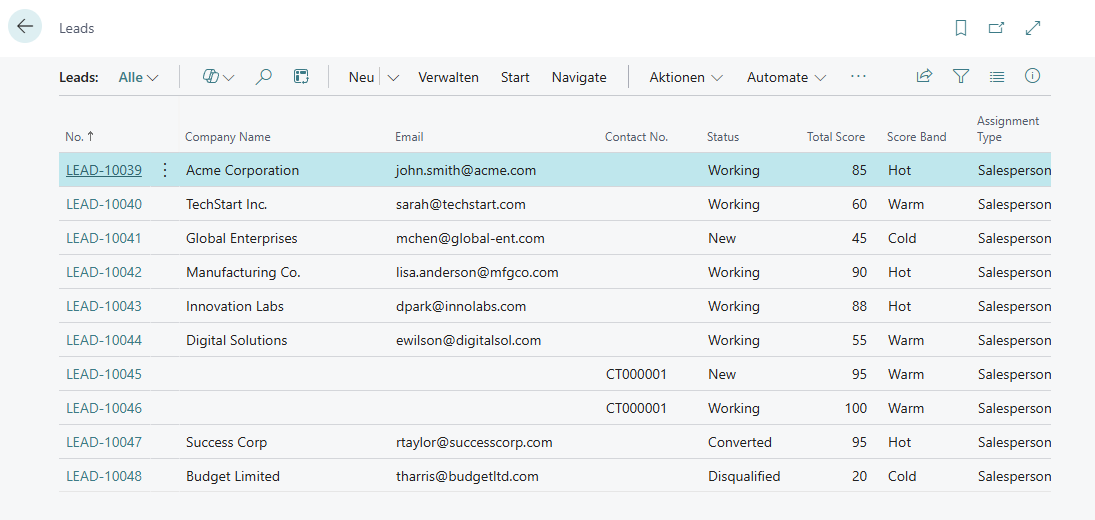 Lead List view with filters and actions
💡 Usage Examples
Example 1: Capture Web Lead
1. Open SEW Leads → Click + New
2. Enter:
   - Quick Company Name: "Contoso Manufacturing"
   - Quick Email: "purchasing@contoso.com"
   - Source Code: WEB
   - Status: New
3. Click Actions → Calculate Score
4. Click Actions → Apply Routing
5. Lead auto-assigned to INBOUND team
Creating a new lead with quick capture
Example 2: Qualify and Convert
1. Open lead → Click Actions → Create/Link Contact
2. Change Status to "Qualified"
3. Click Actions → Convert to Opportunity
4. System creates BC Opportunity with Contact link
5. Lead Status → "Converted"
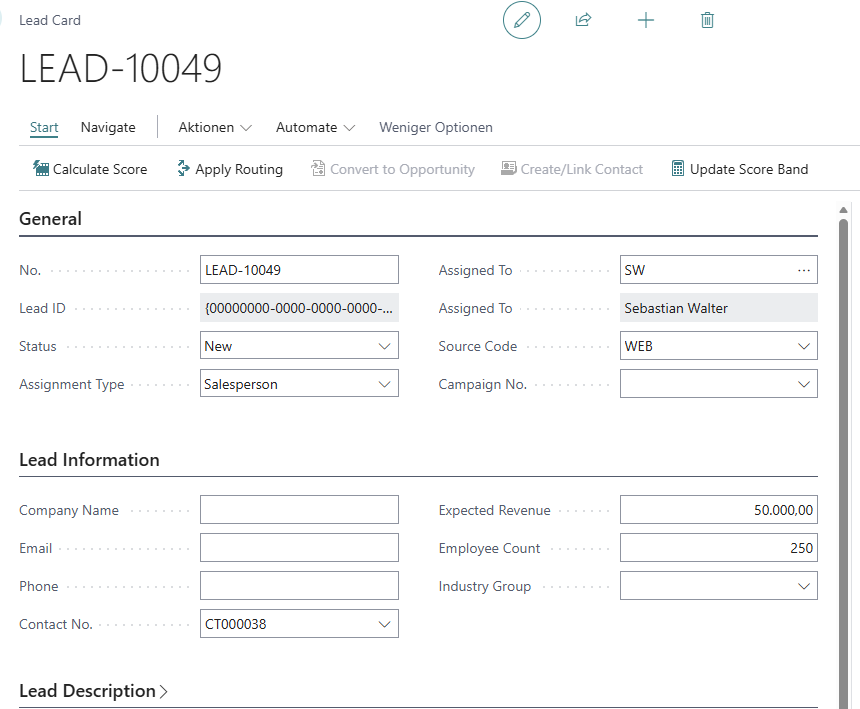 Lead with Contact created and ready for conversion
Example 3: Team Collaboration
1. Create routing rule: Score ≥ 75 → ENTERPRISE Team
2. Create high-score lead (referral + large company)
3. Click Actions → Apply Routing
4. Lead assigned to ENTERPRISE Team
5. All team members see lead in filtered view
6. Convert to opportunity → Select team member for ownership
Team structure for collaborative lead management
Example 4: Pipeline Management
1. Open SEW Lead Kanban board
2. View leads grouped by stage
3. Drag lead from "Contacted" to "Qualified"
4. System updates Stage Code and Probability %
5. Filter by score band to prioritize hot leads
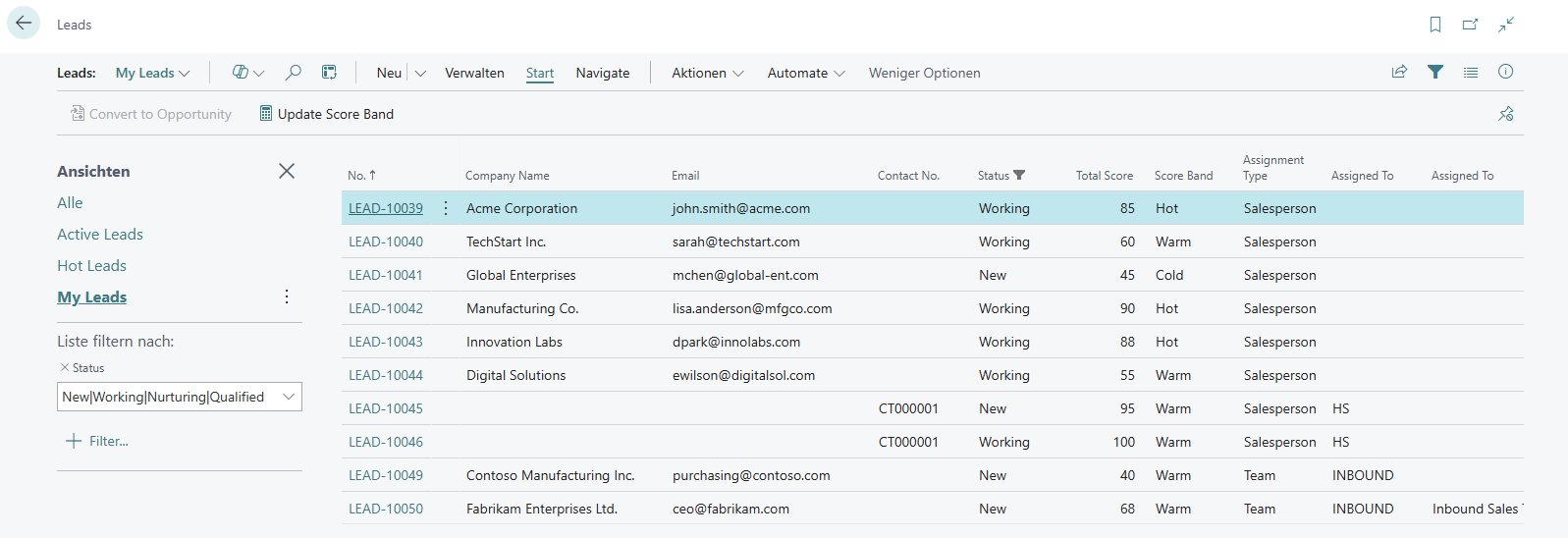 Filtering leads by assignment and status
🔗 Integration Points
Contact Integration
- Auto-create BC Contacts from leads
- Link to existing Contacts via email match
- Sync contact updates back to leads
- Leverage BC’s duplicate management
Contact created from lead with populated fields
Opportunity Integration
- One-click conversion to BC Opportunities
- Transfer salesperson, contact, and value
- Link opportunity back to lead
- Track conversion in Assignment Log
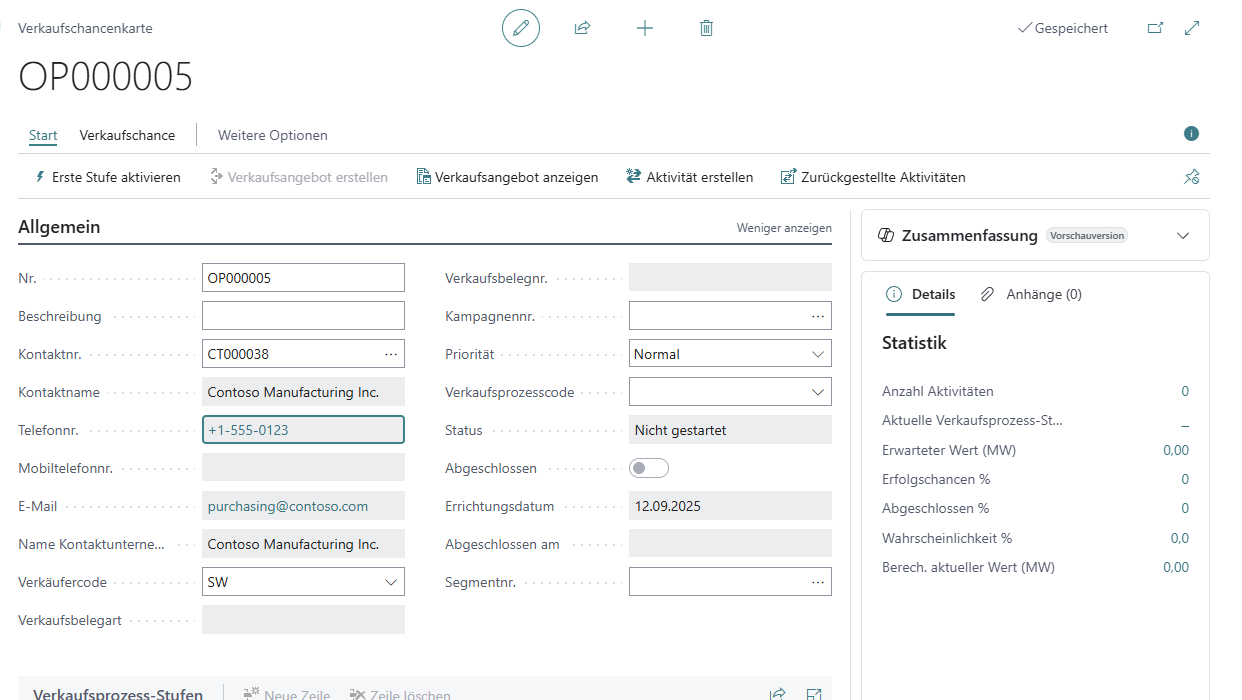 Converted opportunity with data from lead
Campaign Integration
- Link leads to BC Campaigns
- Track campaign effectiveness via Source Performance query
- UTM parameter tracking for digital campaigns
- Campaign ROI analysis
Activity Integration
- Create BC Activities linked to leads
- Track calls, meetings, tasks
- Activity metrics in User Performance query
- Overdue activity alerts
API Integration
Available Endpoints
GET /api/v2.0/companies({id})/sewLeadsPOST /api/v2.0/companies({id})/sewLeadsPATCH /api/v2.0/companies({id})/sewLeads({leadId})DELETE /api/v2.0/companies({id})/sewLeads({leadId})
Integration Scenarios
- Marketing automation platforms → create leads
- Web forms → POST lead data
- Chatbots → capture and score in real-time
- Power Automate → trigger actions on high-score leads
📊 Analytics & Reporting
Built-In Queries
Lead Funnel Analysis (Query 91761)
- Lead count and pipeline value per stage
- Average days in stage calculation
- Conversion rate tracking
- Export to Power BI, Excel
Source Performance (Query 91762)
- Total leads and value by source
- Conversion tracking: converted leads, opportunity value
- Hot leads count by source
- Source Type grouping
User Performance (Query 91763)
- Lead volume and pipeline value by salesperson
- Activity metrics: total, completed
- Conversion metrics: leads, value, avg time
- Filter by status, date, score band
Campaign ROI (Query 91764)
- UTM-based tracking (Campaign, Source, Medium)
- Lead generation metrics
- Conversion rate and opportunity value
- Marketing effectiveness analysis
Analytics Dashboard
Search for SEW Lead Analytics to access:
- Pipeline overview (active leads, value, hot leads, avg score)
- Conversion metrics (rate %, 30-day conversions, opportunity value)
- Activity metrics (open activities, overdue)
- DrillDown navigation to filtered lists
- Color-coded indicators (Favorable/Attention/Unfavorable)
Role Center Component
Add SEW Lead Analytics RC to your Role Center:
- Cue tiles: Active Leads, Hot Leads, New Leads (7d)
- Open/Overdue Activities
- Converted (30d), Conversion Rate
- DrillDown to filtered lists for each cue
- RefreshOnActivate for real-time updates
🎓 Best Practices
Scoring Strategy
- Start Simple: Use STANDARD model initially
- Test & Iterate: Create demo leads, analyze results
- A/B Test: Switch models, compare lead rankings
- Custom Rules: Add industry-specific scoring (e.g., company size thresholds)
- Regular Review: Adjust points based on actual conversion data
Routing Configuration
- Priority Order: Highest priority = most specific rules
- Catch-All: Use Round Robin as lowest priority (default)
- Team Balance: Assign high-score leads to enterprise teams
- Territory: Geographic routing for localized sales
- Load Balance: Round robin prevents lead hoarding
Team Structure
- Inbound Team: Fast response to web/email leads
- Enterprise Team: High-score leads requiring consultative selling
- Vertical Teams: Industry-specific teams (manufacturing, retail)
- Team Size: 3-5 members per team for optimal collaboration
- Clear Ownership: Define when leads transition from team → individual
Pipeline Management
- Stage Definition: Keep stages simple (4-6 stages typical)
- Probability Alignment: Set realistic % per stage
- Stage Time Limits: Use Avg Days in Stage to identify bottlenecks
- Regular Cleanup: Move stale leads to Nurture or Disqualified
- Kanban Usage: Weekly pipeline review meetings using Kanban board
🔍 Troubleshooting
⚠️ Common Issues
Scoring not calculating:
- Ensure at least one Scoring Model is set to Active
- Check Scoring Rules have point values > 0
- Verify lead fields match rule conditions
Routing not assigning:
- Check at least one Routing Rule exists with Active = true
- Verify rule conditions match lead attributes
- Ensure Team/Salesperson Code is valid and active
Opportunity conversion fails:
- Lead Status must be "Qualified"
- Lead must have Contact No. populated (click Create/Link Contact first)
- User must have permissions to create Opportunities
Assignment Log empty:
- Use "Apply Routing" action to trigger routing and logging
- Manual assignment changes require saving the record
- Check permissions on SEW Lead Assignment Log table
📚 Additional Resources
Step-by-step instructions for end users
Get the latest release
Submit bugs or feature requests
🚀 Roadmap
Phase 1: MVP ✅ (Completed Dec 2024)
- ✅ Lead capture with quick fields
- ✅ Multi-model scoring engine
- ✅ Priority-based routing
- ✅ Team collaboration
- ✅ Opportunity conversion
- ✅ Assignment audit trail
Phase 2: Advanced ✅ (Completed Dec 2024)
- ✅ Lead stages and pipeline
- ✅ Activity integration
- ✅ Kanban visual board
- ✅ Analytics dashboard
- ✅ Performance queries
Phase 3: Premium ✅ (Completed Dec 2024)
- ✅ UTM attribution tracking
- ✅ Lead→Opportunity mapping
- ✅ Document attachment links
- ✅ Role Center integration
Future Enhancements
- 📅 Bulk import from CSV/Excel
- 📅 Email integration (auto-create leads from inbox)
- 📅 Predictive scoring with AI
- 📅 Mobile app optimization
- 📅 AppSource certification